Models
A model is a saved query that keeps a table up to date. It rebuilds on a schedule, or when the pipelines and models it reads have been refreshed, so what you report on is current.
What a model is
A model starts as a query you saved in the Explorer. Give it a materialization and it becomes a model:
| Mode | What it does |
|---|---|
table | Rebuilds a table from the query, as CREATE TABLE … AS. You name the target table. |
statement | Runs the stored SQL exactly as written. Made for a MERGE, UPDATE or INSERT … SELECT, which names its own destination. |
| None | A plain saved query, a bookmark. It isn't a model and can't be scheduled. |
- The work happens in your database. rsync.ai sends the statement to your connection and your database builds the table.
- A model runs as an owner or admin: you become the run-as user when you schedule it or select Run now. Everyone in the workspace can see a model that's shared with it, its runs and what it reads.
- Charts and dashboards read models. Build a model once, then draw it on as many charts as you like.
Models run on PostgreSQL, MySQL and MariaDB, SQL Server, Databricks and BigQuery. On MongoDB a model is a saved pipeline whose result is written to a collection. Snowflake, Redshift, ClickHouse and Oracle models are in preview.
Bronze, silver and gold
Tables a pipeline lands are your bronze layer. A model sits on top of them as silver (cleaned and joined) or gold (ready to report on). The layer shows as a badge on the Models page and in Lineage, and you can filter the page by layer.
- Layers belong to the workspace. An owner or admin adds, renames, orders and deletes them in Workspace settings. A new workspace starts with none.
- Ask rsync.ai can create a silver model for a table. Its SQL is built from the table's column names and types, without a language model and without reading a row. See Ask rsync.ai.
When a model runs
A model has one trigger. It has a clock or a set of upstreams, never both.
| Trigger | Runs |
|---|---|
| Schedule | On a five-field cron expression in a timezone you choose. The page shows it in words, such as “Every day at 03:00 (UTC)”. |
| Interval | On a fixed repeat interval. |
| After upstreams | When what it reads has been refreshed. Name up to 16 upstreams: pipelines, other models, or both. |
| Manual | Only when you select Run now. |
After upstreams, instead of guessing a time
A cron has to guess how long a pipeline usually takes. Guess short and the model rebuilds from yesterday's data and still reports success. Guess long and the dashboard is stale for hours. An upstream trigger fires when the thing it reads finishes, so a model that reads a staging model needs no guess.
- Any or all. With any, each upstream finishing rebuilds the model. With all, it rebuilds once every upstream has succeeded since its last rebuild. Until then the run is recorded as skipped, with how many upstreams it is still waiting for.
- Chains work. A model that rebuilds starts the models below it, so a bronze → silver → gold chain runs in order. Only a run that succeeded does this.
- CDC pipelines count. A CDC pipeline never finishes, so it triggers its models after each window of changes (15 minutes by default).
Approval for scheduled SQL
A scheduled model rebuilds a table other people read, so editing its SQL doesn't change what the next run does. The edit becomes a proposal that an admin approves.
- The name, description and who can see it change straight away. Only the SQL waits.
- The schedule keeps running the approved SQL until the proposal is approved.
- A member can propose a change but can't approve it. Every approval is in the audit log.
- If the query changed after a proposal was made, the proposal is marked out of date before anyone approves it.
Every run checks who it runs as
Each run starts by working out, again, who it runs as and what they are allowed to do. Nothing is trusted from when the model was created.
| The SQL | Role it needs |
|---|---|
SELECT, WITH | Any member |
INSERT, UPDATE, DELETE, MERGE, CREATE, ALTER | Admin |
DROP, TRUNCATE | Owner |
GRANT, REVOKE, CALL, EXEC, SET | Never |
Version history
Every edit to a model's SQL keeps the version before it. Open the history to see who changed what, read a line-by-line diff of the change, and restore an old version.
- A restore is a normal edit.On a scheduled model it goes through the same approval, so it can't sidestep it.
- History is kept until an admin sets a retention policy for the workspace.
Freshness deadlines
A schedule only fires when something happens. A paused schedule, an emptied upstream list or a rebuild that fails every hour leaves a model looking set up while its table stops moving. A freshness deadline is the check for that: this table should never be more than N behind.
- Set it on the model, from 1 minute to 1 year. Without one, a model is never reported as late.
- The clock runs from the model's last successfulrun. A model that fails every night doesn't look fresh.
- A late model shows Overdue on the Models page and in About this chart on every dashboard tile built on it. See Dashboards.
- It reports; it never rebuilds. Nothing starts a run because a model went stale.
Data checks
Add checks to a model and they run inside every rebuild. The model's Checks tab lists each one and its result for a run.
| Check | Looks for |
|---|---|
| Row count | A table with fewer rows than a minimum, or more than a maximum, that you set. |
| Row count change | A row count that dropped by more than a percentage you set since the last good run, and optionally one that grew by more than another. |
| Not null | Empty values in a column that should always have one. |
| Unique | Duplicate values in one to ten columns. Empty values are ignored. |
| Custom SQL | A read-only SELECT that returns the rows that break your rule. Any row fails the check. {{this}} stands for the model's table. On a scheduled model it goes through the same approval as the model's SQL. |
- Block or warn. A failed block check keeps the build from replacing the live table and skips what runs after it. A failed warn check publishes the table and alerts. Blocking is the default, except for row count change, which warns.
- A model can have up to 20 checks. Their results show in a dashboard tile's About this chart as Checks n of m passed.
Watching your models
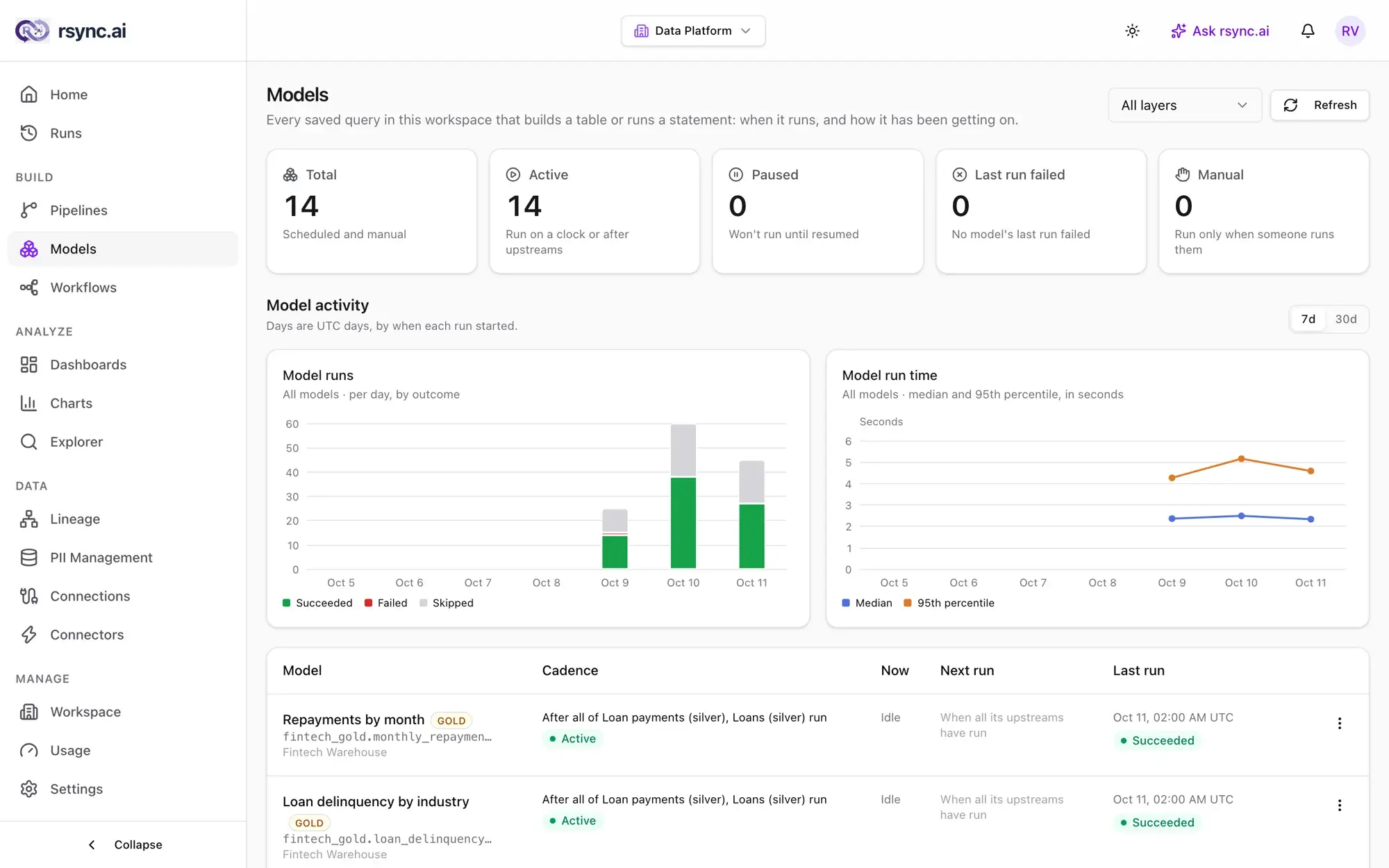
- The Models pageshows each model's cadence, its state right now (Idle, Waiting or Rebuilding), its next run and its last run, with run counts and run time per day for 7 or 30 days.
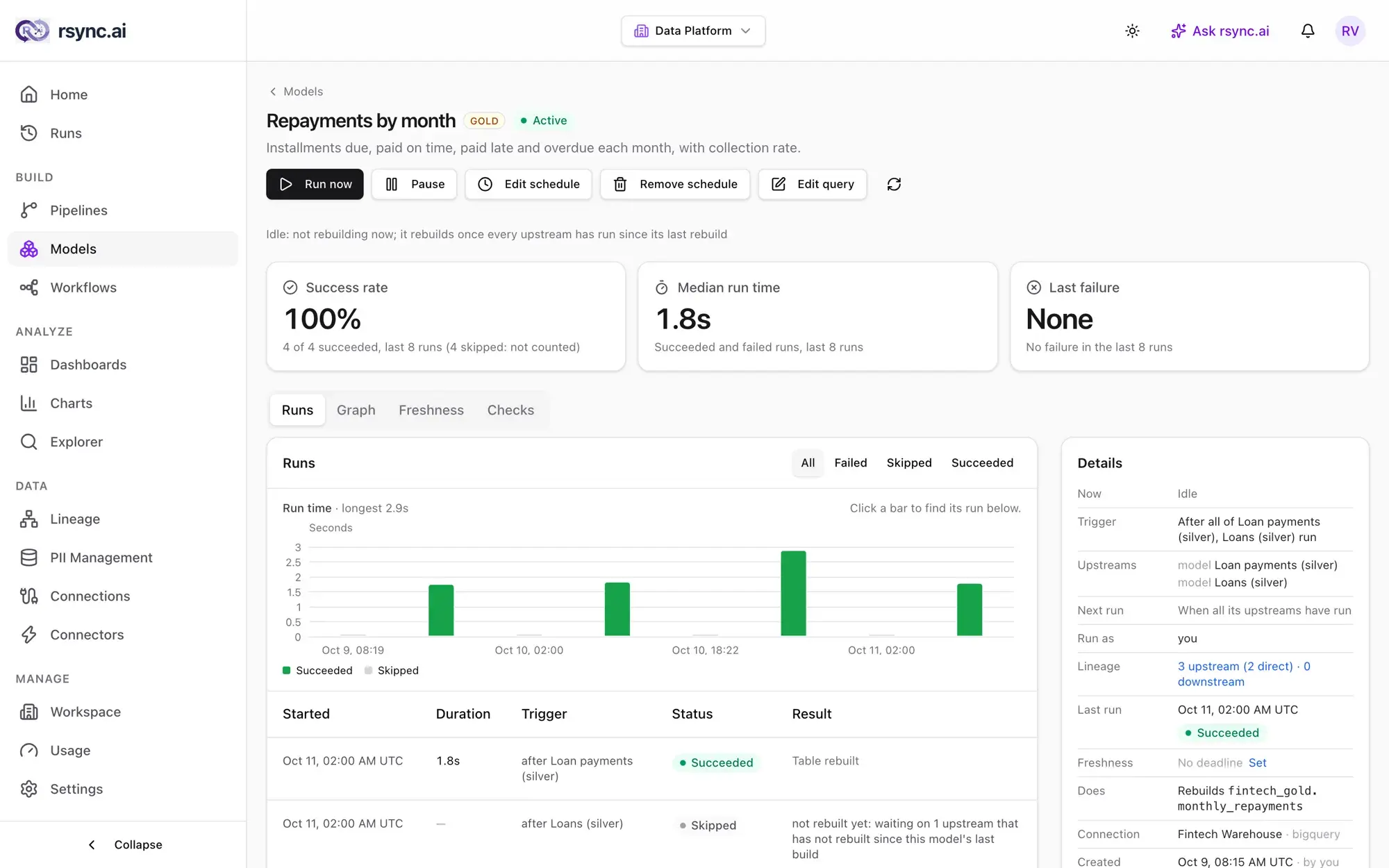
- A model's own pagehas Runs, Graph, Freshness and Checks tabs, a run-time chart, and the success rate and median run time over its last runs. Skipped runs aren't counted against it.
- Runs lists model runs together with pipeline and workflow runs, and Lineage flags a model that is refreshed by hand even though it reads something that is refreshed on a schedule. See the workspace tour.
Ready to try it?
Start building on rsync.ai Cloud today — or self-host on your own infrastructure.